If one of your greatest challenges is increasing your email subscribers list, you’re not alone.
Without an email list of people who have a continued interest in reading and finding value in your content, you’ll need a lot of search engine traffic to survive.
Its not easy building your list and can take a considerable amount of time.
However, there is one smart move which you can use right now to add anywhere from 10-30% more email subscribers.
This trick may take you anywhere from 20 minutes to an hour to complete and can increase the size of your e-mail list by anywhere from 10 to 30% or more right now.
I guarantee it because i used it today and use it every 3-6 months because it works.
Update 16 Oct 2014: Checked the unverified email subscribers today and picked up another 139 unverified email subscribers from the last 3-4 months.
What If I Don’t Use RSS Via Email?
This trick only works if you have been using Feedburner email subscriptions.
If you are using another email service, you’ll need to check if you have access to email subscribers who have signed up but for some reason haven’t confirmed their subscription by clicking the link in the confirmation email.
Its o.k to find these emails and import them to your list or email them to complete the verification process.
You can add them to Mad Mimi for free or any other email service including any of the WordPress newsletter services which allow import of email addresses. They’ve signed up so they’ve given you permission to add them to your list.
If for some reason they didn’t want to double opt in, then they can unsubscribe using the next email you send them. No harm done.
Finding Unverified Email Subscribers
Feedburner makes it easy to find subscribers that haven’t confirmed their subscription to your list.
Here’s the steps you need to take to find them:
- Go to http://feedburner.google.com/fb/a/myfeeds
- Go to Feed Stats > Subscribers
- FeedBurner Email Subscriptions > Manage Your Email Subscriber List > Unverified Email Addresses
Scroll down and you’ll find a list of your email subscribers
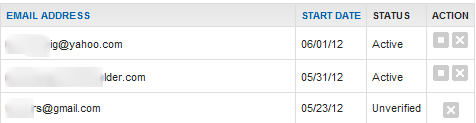
Here you’ll find subscribers who have subscribed to your list but haven’t verified their subscriptions.
You can either:
- Send them an email asking them if they still want to subscriber and add them manually
- Add them to your email service manually or use the bulk import feature
Leave a Reply