
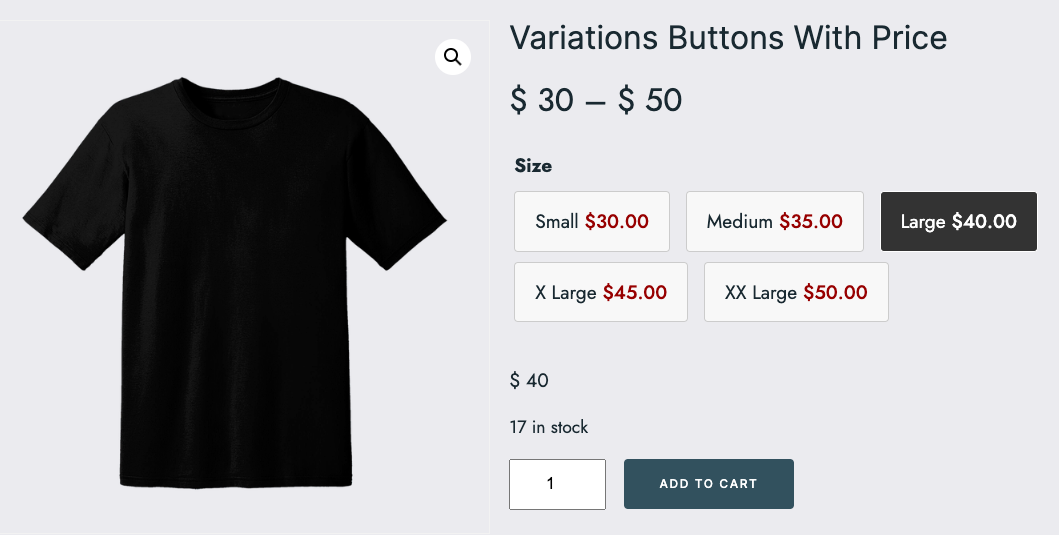
This tutorial contains the code which enables you to display your variations as buttons with the price foreach variation included within the button. The code makes 2 changes to your variations :
- Changes your variations from a drop down menu to buttons
- Displays the price foreach variation within each variation button
Code Test Video
Shows the variations drop down menu converted to buttons with price foreach variation displaying within each button.
Coming Soon!
Installation
There’s 3 steps :
- Upload the woocommerce folder and var-buttons.js to your child theme folder
- Copy and paste the PHP code from the functions.php file to the end of your child themes functions file
- Copy and paste the CSS from the style.css file to the end of your child themes style sheet and clear caching.
Related Solutions
- Variations As Buttons in WooCommerce
- Apple Style Product Addons Page Template for WooCommerce
- Variation Addons Block With Price Difference for WooCommerce
Was this helpful?
Thanks for your feedback!
Leave a Reply
You must be logged in to post a comment.