
This plugin enables you to sell gold products like jewelry based on the dynamic spot price using either a premium or free API or by manually entering and update the gold price for all products globally or per product.
The plugin adds :
- a new menu to your WordPress dashboard where you can add your API key, set a global gold price manually that matches your currency setting and update the price of gold for your products instantly
- single product page fields added to the General tab for simple products and variations where you can add the weight in grams, a optional markup percentage and extra fee
Here’s the screenshots showing the settings :
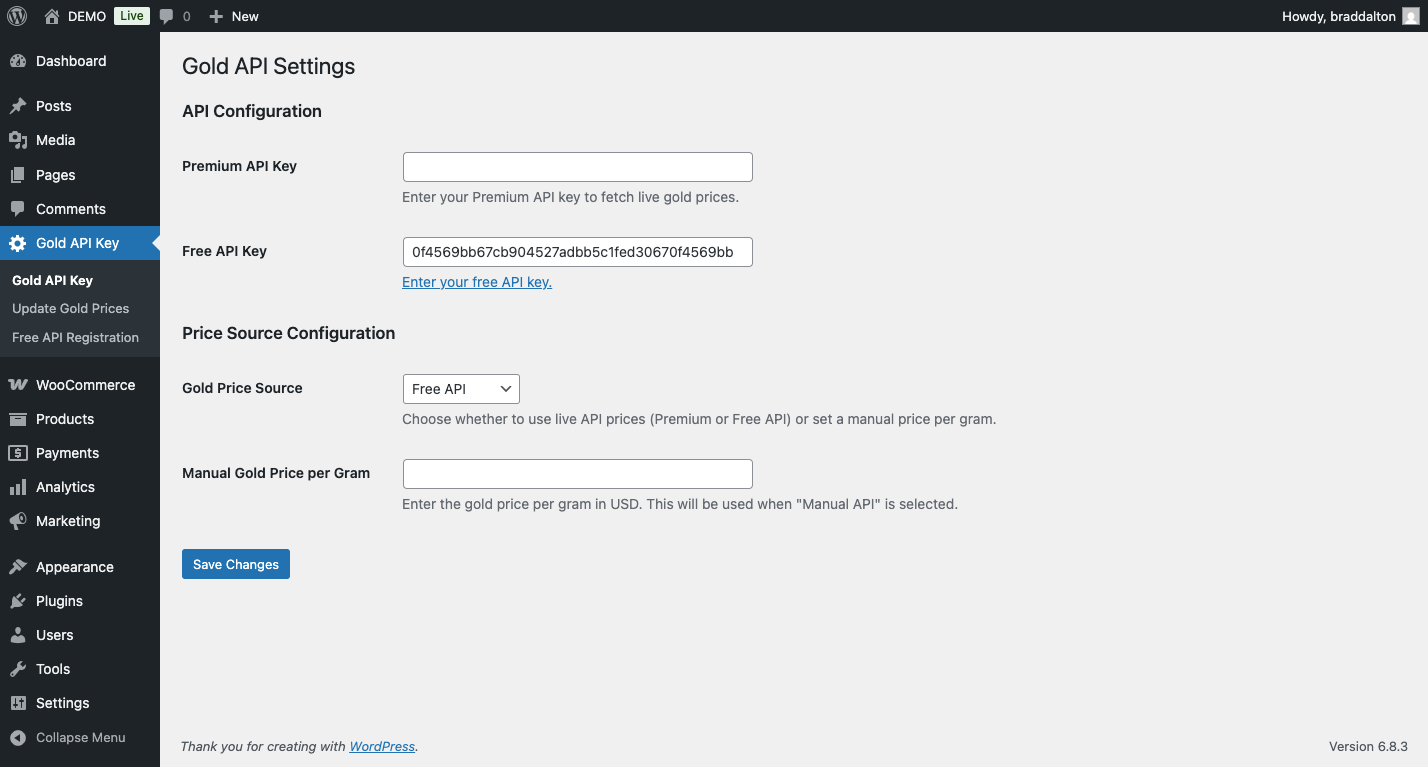
== Description ==
Dynamic Gold Price for WooCommerce Products allows you to automatically update product prices based on the current gold price. Perfect for jewelry stores and gold dealers, this plugin:
- Automatically updates product prices based on current gold prices
- Supports both simple and variable products
- Allows setting markup percentages at both product and category levels
Features
Core Functionality
- Automatic Price Calculation: Calculate product prices based on gold weight and markup percentage
- Multiple Price Sources: Use live Premium API prices, live Free API prices, or set manual gold prices
- Individual Product Updates: Update single product prices without affecting others
- Bulk Price Updates: Update all products and variations with gold pricing settings at once
- Scheduled Updates: Automatic daily price updates via WordPress cron
- Full Variation Support: Individual gold pricing for each product variation
- Fixed Extra Pricing: Additional fixed amount added to calculated prices
- Category Inheritance: Products inherit gold pricing from their categories
- Category-Level Defaults: Set default gold pricing for entire product categories
Pricing Options
- Premium API Pricing: Real-time gold prices from your premium provider
- Free API Pricing: Real-time gold prices from your free provider
- Manual Pricing: Set a custom gold price per gram
- Flexible Markup: Support for any markup percentage (including 0%)
- Weight-Based Calculation: Price calculation based on product gold weight in grams
- Automatic Currency Integration: Uses your WooCommerce store currency automatically
- Fixed Extra Amount: Additional fixed pricing for extra costs (labor, settings, etc.)
- Variation-Specific Pricing: Different gold pricing for each product variation
- Category Defaults: Set default gold pricing for entire product categories
- Smart Inheritance: Products automatically inherit category settings when fields are empty
User Interface
- Simplified Interface: All settings in the General tab for easy access
- Styled Update Button: Professional-looking update button with loading states
- Real-time Feedback: AJAX updates with success/error messages
- Admin Settings Page: Centralized configuration for API keys and pricing options
- Variation Interface: Individual gold pricing fields for each product variation
- Centered Buttons: Professional button positioning and styling
- Enhanced Styling: Modern UI with hover effects and responsive design
- Category Management: Easy category-level gold pricing configuration
- Clean Interface: Streamlined product edit pages without unnecessary notices
Installation
- Activate the plugin through the ‘Plugins’ menu in WordPress
- Go to WordPress Admin → Gold API Key to configure settings
Configuration
API Configuration
- Get Premium API Key: Sign up with your preferred premium gold price provider and copy your API key
- (Optional) Get Free API Key: Sign up with your preferred free gold price provider and copy your API key
- Enter API Keys: Go to Gold API Key settings and enter your Premium API key and (optionally) your Free API key
- Choose Price Source: Select between Premium API, Free API, or Manual API
Manual Pricing
- Set a fixed gold price per gram in your store’s currency
- Automatically uses your WooCommerce currency (EUR, USD, GBP, etc.)
- Useful when API is unavailable or for testing
- Overrides API pricing when selected
Category Defaults
- Go to Products → Categories: Navigate to product category management
- Edit Category: Click “Edit” on any product category
- Set Defaults: Enter default Gold Weight, Markup %, and Fixed Extra
- Save Category: Save the category settings
- Automatic Inheritance: Products in this category will use these defaults when their fields are empty
Usage
Setting Up Products
Simple Products
- Edit Product: Go to any WooCommerce product edit page
- General Tab: Find the gold pricing fields in the General tab
- Set Gold Weight: Enter the weight of gold in grams (e.g., 10.5)
- Set Markup: Enter markup percentage (e.g., 25 for 25% markup)
- Set Fixed Extra: Enter additional fixed amount (optional)
- Update Price: Click “Update Price Now” to calculate and apply price
Variable Products
- Edit Product: Go to any WooCommerce variable product edit page
- Variations Tab: Find the gold pricing section for each variation
- Set Variation Fields: Enter Gold Weight, Markup %, and Fixed Extra for each variation
- Update Individual Prices: Click “Update Price Now” for each variation
- Different Settings: Each variation can have different gold pricing settings
Price Calculation Formula
Final Price = (Gold Price per Gram × Product Weight) × (1 + Markup Percentage ÷ 100) + Fixed ExtraExample (USD Store):
- Gold Price: $135 per gram
- Product Weight: 10 grams
- Markup: 50%
- Fixed Extra: $100
Calculation:
- Base Cost: $135 × 10 = $1,350
- Markup Amount: $1,350 × 50% = $675
- Fixed Extra: $100
- Final Price: $2,125
Example (EUR Store):
- Gold Price: €120 per gram
- Product Weight: 10 grams
- Markup: 50%
- Fixed Extra: €80
Calculation:
- Base Cost: €120 × 10 = €1,200
- Markup Amount: €1,200 × 50% = €600
- Fixed Extra: €80
- Final Price: €1,880
Updating Prices
Single Product Update
- Edit Product: Go to the product edit page
- Click “Update Price Now”: Button appears when weight and markup are set
- Confirmation: Confirm the update in the dialog
- Automatic Update: Price updates without page redirect
Variation Updates
- Edit Variable Product: Go to the variable product edit page
- Variations Tab: Find the gold pricing section for each variation
- Click “Update Price Now”: Individual button for each variation
- Individual Pricing: Each variation can have different gold settings
Bulk Updates
- Admin Menu: Go to Gold API Key → Update Gold Prices
- Click “Update Now”: Updates all products AND variations with gold pricing settings
- View Results: See which price source was used
- Complete Coverage: Processes both simple products and all product variations
Settings
Gold API Settings Page
API Configuration:
- Gold API Key: Your Premium API key
- Free Gold API Key: Your free API key (optional)
- Price Source: Choose between Premium, Free, or Manual API
GoldPricez Registration Help Page:
- Accessible via Gold API Key → GoldPricez Registration in the WordPress admin menu
- Shows step-by-step instructions and a direct link to the official GoldPricez registration docs
- Summarizes activation requirements (emailing your API key and site URL) and links back to the main Gold API Settings page
Price Source Configuration:
- Premium API: Live prices from your premium provider in your store’s currency
- Free API: Live prices from your free provider in your store’s currency
- Manual API: Fixed price per gram in your store’s currency
Manual Gold Price per Gram:
Automatically matches your store’s currency setting
Enter the gold price per gram in your WooCommerce store currency
Reviews
There are no reviews yet.