
WP MAIL PRO is a plugin that enables you to automatically configure your WordPress site to use the servers from your email account without needing to set SMTP server details.
There is no quicker and easier solution for using your Gmail, Zoho or Hotmail accounts to send your WordPress & WooCommerce emails.
Features
- Popular Mailer Presets: Pre-configured settings for Gmail, Zoho Mail, Outlook, and Yahoo Mail
- Custom SMTP Support: Configure any SMTP server with full control over settings
- Easy Configuration: User-friendly tabbed admin interface with real-time testing
- Gmail App Password Guide: Step-by-step instructions with official Gmail branding
- Debug Data Management: Comprehensive debugging tools with log viewing and clearing
- Security: Encrypted password storage and WordPress security best practices
- Test Functionality: Test SMTP connection and send test emails directly from the admin
- Reliable Delivery: Overrides ALL WordPress emails including WooCommerce notifications
- Mobile Responsive: Works perfectly on all devices
- Top-Level Menu: Easy access from WordPress dashboard with email icon
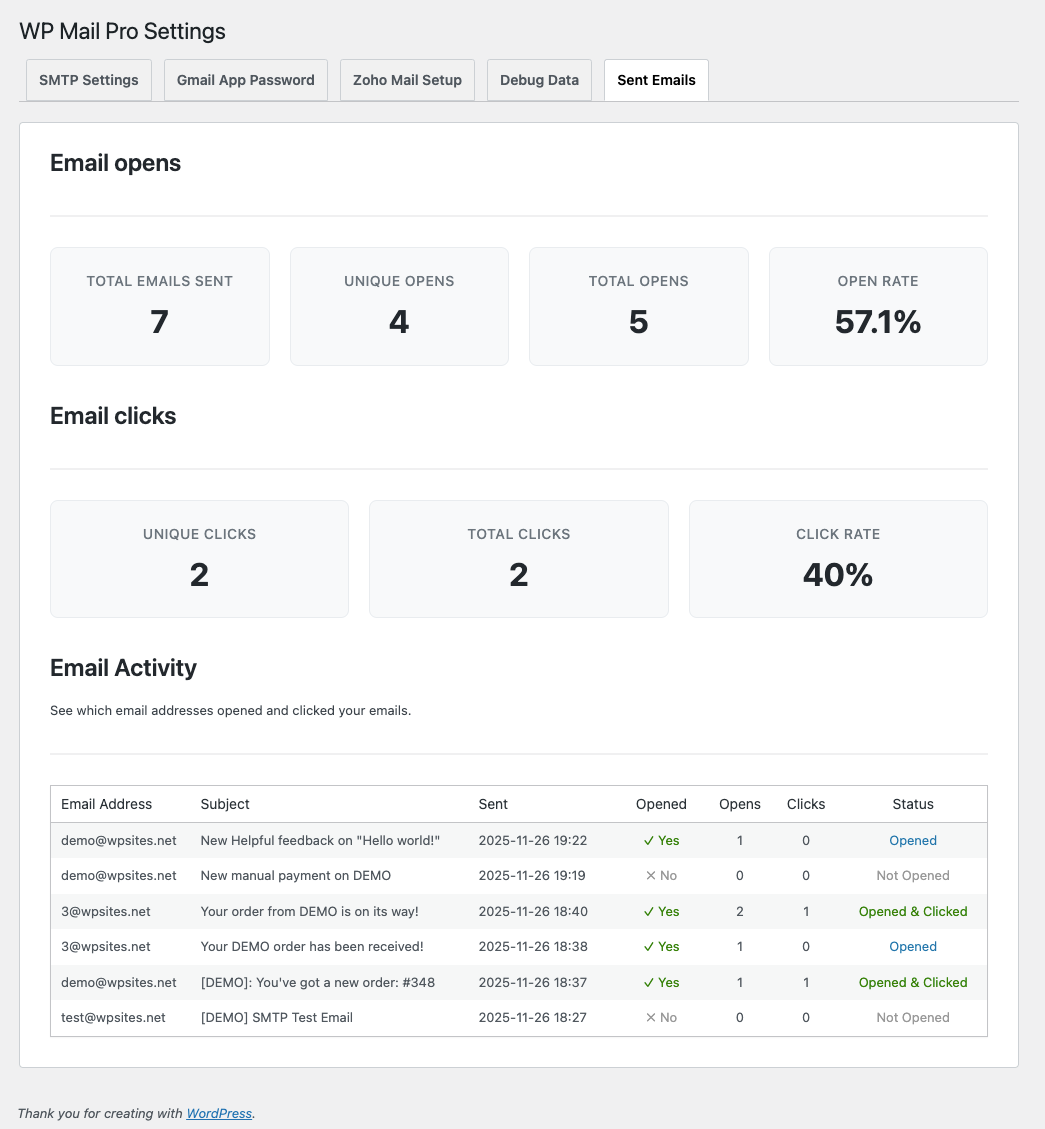
- Email Tracking & Analytics: Track email opens and clicks with detailed statistics dashboard
Email Tracking & Analytics
WP Mail Pro includes built-in email tracking and analytics:
- Go to the Sent Emails tab
- Email Opens Section: View statistics for email opens:
- Total emails sent
- Unique opens
- Total opens
- Open rate (percentage)
3. Email Clicks Section: View statistics for link clicks:
- Total opens
- Total clicks
- Click rate (percentage)
How It Works:
- All emails sent through WP Mail Pro are automatically tracked
- A tracking pixel is added to HTML emails to track opens
- All links in emails are automatically wrapped with tracking URLs
- Statistics are calculated and displayed in real-time
- Data is stored securely in WordPress options
Installation
After plugin installation and activation, go to Settings > WP Mail Pro to configure your email address and app password.
Configuration
Using Popular Mailer Presets
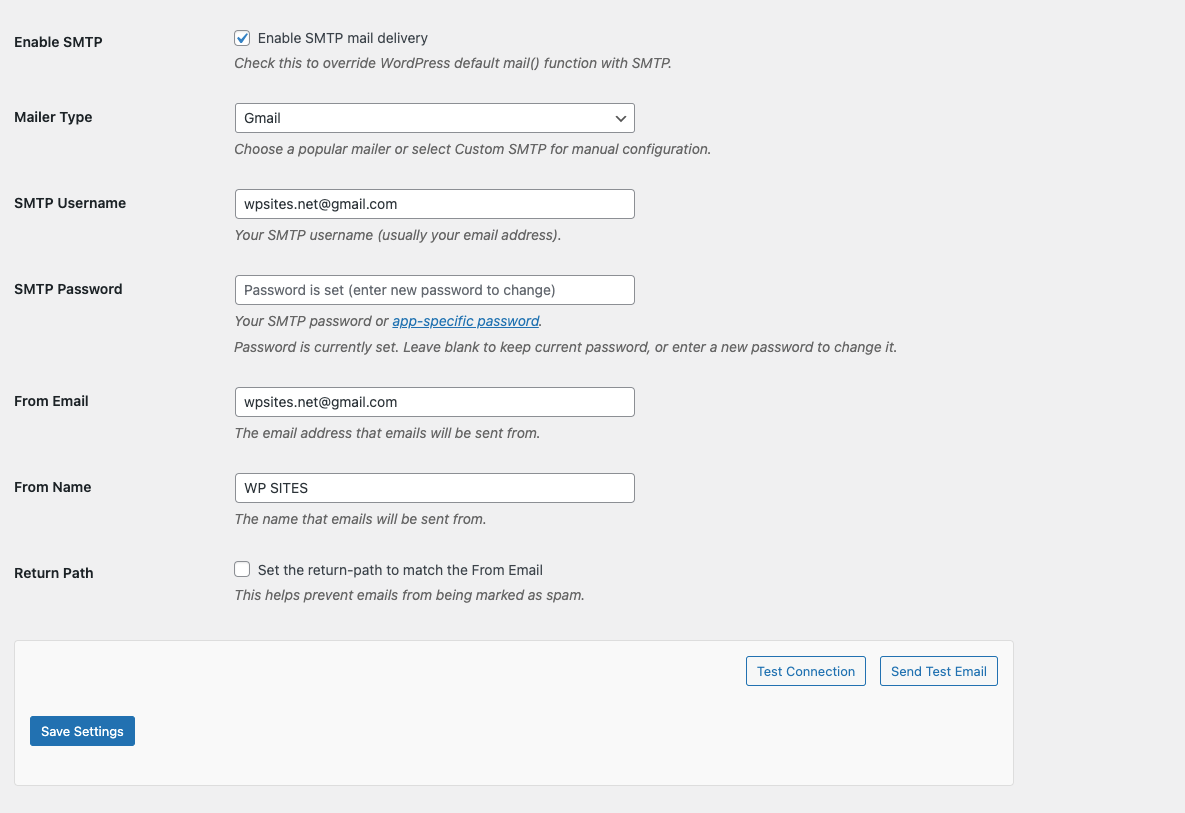
- Go to WP Mail Pro in your WordPress dashboard
- Check Enable SMTP
- Select your mailer type from the dropdown
- Enter your email credentials
- Click Test Connection to verify settings
- Click Save Settings
Available Mailer Types:
- Gmail: For Gmail accounts
- Gmail (SSL): Gmail with SSL encryption
- Zoho Mail: For Zoho Mail accounts
- Zoho Mail (SSL): Zoho Mail with SSL encryption
- Outlook/Hotmail: For Microsoft email accounts
- Yahoo Mail: For Yahoo email accounts
Gmail App Password Setup
For Gmail users, we provide a super simple setup guide :
- On the plugin settings page, go to the Gmail App Password tab
- Follow the step-by-step instructions with official Gmail branding
- Use the direct links to Google Account settings
- Generate your App Password and configure the plugin
Learn more about : How To Send Order Emails From Gmail
Using Custom SMTP
- Select Custom SMTP from the mailer type dropdown
- Configure the SMTP settings
- Set your From Email and From Name
- Test and save your configuration
SMTP Settings to Configure:
- SMTP Host: Your SMTP server hostname
- SMTP Port: Usually 587 for TLS or 465 for SSL
- Encryption: Choose TLS, SSL, or None
- Authentication: Enable if your server requires it
- Username/Password: Your SMTP credentials
Popular Mailer Setup Instructions
Gmail Setup
- Enable 2-factor authentication on your Google account
- Generate an App Password for your WordPress site
- Use your Gmail address as the SMTP username
- Use the App Password as the SMTP password
To Generate App Password:
- Go to Google Account settings
- Security > 2-Step Verification > App passwords
- Generate a new app password
Zoho Mail Setup
- Log into your Zoho Mail account
- Go to Settings > Mail Accounts > POP/IMAP Access
- Enable IMAP/POP access if not already enabled
- Use your Zoho email and password for SMTP authentication
Outlook/Hotmail Setup
- Enable SMTP authentication in your Microsoft account
- Use your Outlook email address and password
- The plugin will automatically configure the correct server settings
Testing
The plugin includes built-in testing functionality:
- Test Connection: Verifies your SMTP settings without sending an email
- Send Test Email: Sends a test email to verify everything is working
Email Coverage
WP Mail Pro overrides ALL WordPress emails including:
- WooCommerce emails (order confirmations, notifications, etc.)
- WordPress core emails (password resets, user registrations, etc.)
- Plugin emails (contact forms, newsletters, etc.)
- Custom emails (any email sent via
wp_mail())
Security Features
- Encrypted password storage using WordPress security functions
- Proper nonce verification for all form submissions
- Capability-based access control
- Input sanitization and validation
- WordPress coding standards compliance
Reviews
There are no reviews yet.