
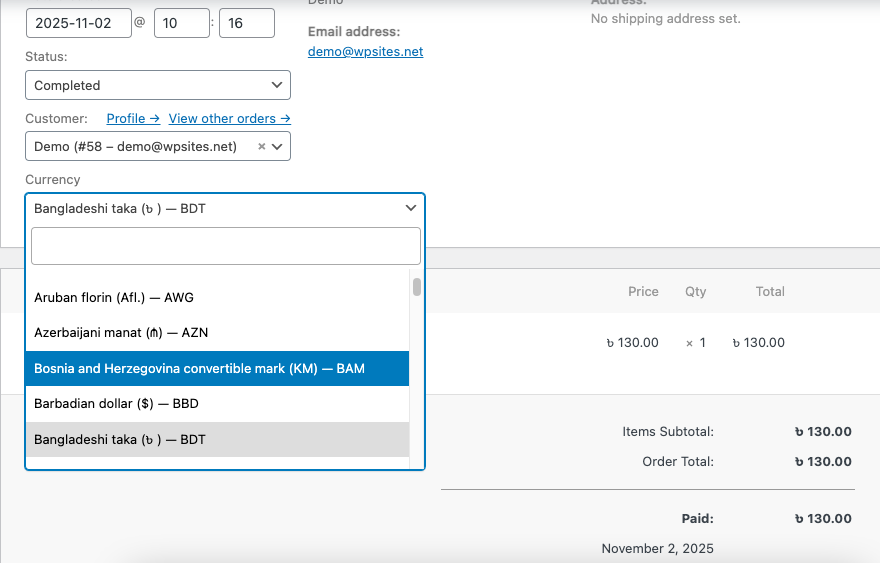
A WordPress plugin that allows you to switch currencies on WooCommerce manual orders. The default currency can be set at anything, and you can create manual orders in any other currency.
Features
- Switch currencies when creating or editing manual orders
- Currency selector appears in the order edit page
- Displays selected currency in order details
- Integrates seamlessly with WooCommerce
- Full HPOS (High-Performance Order Storage) compatibility
Installation
- Upload the
Currency Switcherfolder to the/wp-content/plugins/directory - Activate the plugin through the ‘Plugins’ menu in WordPress
- Ensure WooCommerce is installed and activated
Usage
- Navigate to WooCommerce → Orders
- Create a new order or edit an existing order
- In the order edit page, you’ll see a “Order Currency” field
- Select your desired currency from the dropdown
- Save the order
The selected currency will be saved and displayed in the order details.
Demo Video
Shows how you can switch currencies to create orders in currencies different to your default currency setting.
Reviews
There are no reviews yet.