
Track every email you send from your WordPress site with WP Mail Pro. See who opens your emails and which links they click.
What is Email Tracking?
Email tracking shows you:
- How many emails you’ve sent
- How many people opened your emails
- How many times links were clicked
- Your open rate and click rate
This helps you understand if your emails are working.
How WP Mail Pro Tracks Emails
WP Mail Pro automatically tracks all emails sent through your WordPress site. This includes:
- WooCommerce order emails
- WordPress password reset emails
- Contact form emails
- Any email sent via wp_mail()
View Your Email Statistics
- Go to WP Mail Pro in your WordPress dashboard
- Click the Sent Emails tab
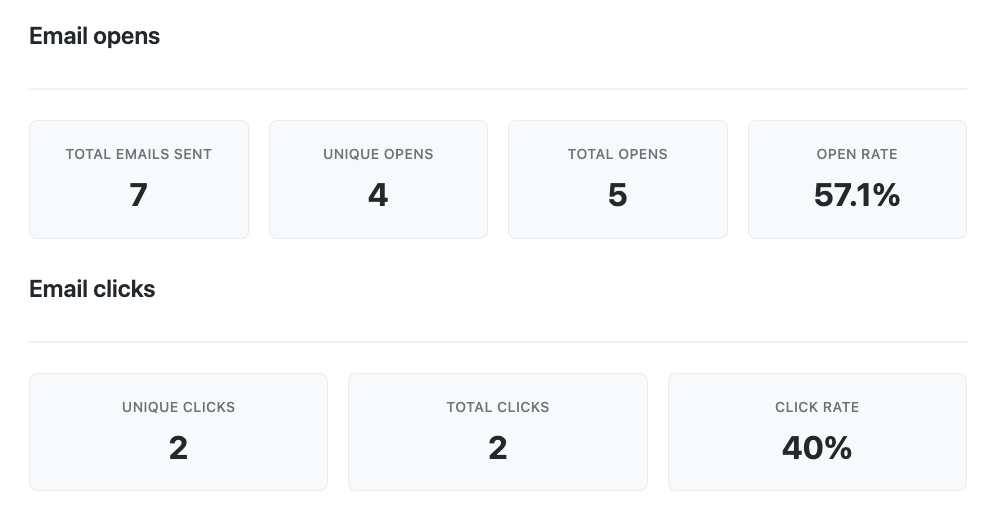
- See your email statistics:
- Total emails sent
- Unique opens
- Total opens
- Open rate
- Total clicks
- Click rate
Track Individual Email Addresses
WP Mail Pro shows you which email addresses opened and clicked your emails. The Email Activity table displays:
- Email address of each recipient
- Subject line of each email
- When the email was sent
- Whether it was opened
- How many times it was opened
- How many times links were clicked
- Overall status (Opened & Clicked, Opened, Not Opened)
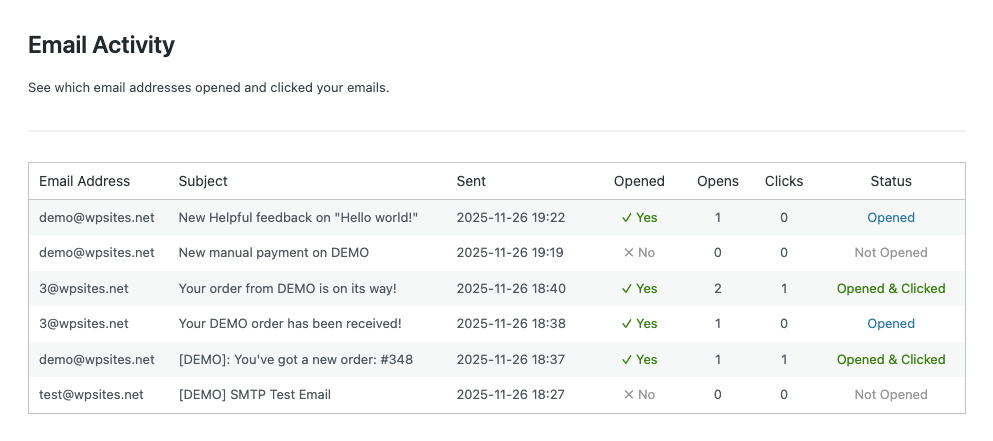
This helps you see exactly which subscribers are engaging with your emails.
How It Works
When you send an email through WP Mail Pro:
- The email is tracked automatically
- A tiny invisible image is added to track opens
- All links are wrapped to track clicks
- Statistics update in real-time
Data Displayed in the Email Activity Table
The Email Activity table in WP Mail Pro shows detailed information for each email you send. Here’s what you’ll see:
Email Address – The recipient’s email address who received the email
Subject – The subject line of the email
Sent – The date and time when the email was sent (formatted as Y-m-d H:i)
Opened – Whether the email was opened at least once (Yes or No)
Opens – The total number of times the email was opened
Clicks – The total number of times links in the email were clicked
Status – The overall engagement status:
- Opened & Clicked (green) – Email was opened and links were clicked
- Opened (blue) – Email was opened but no links were clicked
- Clicked Only (orange) – Links were clicked but email wasn’t opened (rare)
- Not Opened (gray) – Email hasn’t been opened yet
The table displays the 100 most recent emails, sorted by newest first. This gives you a clear view of which emails are performing well and which recipients are most engaged with your content.
Get Started
Install WP Mail Pro to start tracking your emails today. It works with Gmail, Zoho, Hotmail and any other SMTP server you use to send you WordPress emails.
No coding required. Just install, configure your SMTP settings, and start tracking.
Leave a Reply
You must be logged in to post a comment.