
This code adds a table for quantity discounts on your single product page in WooCommerce. The table includes a column for the quantity and a column for the discounted price, per unit.
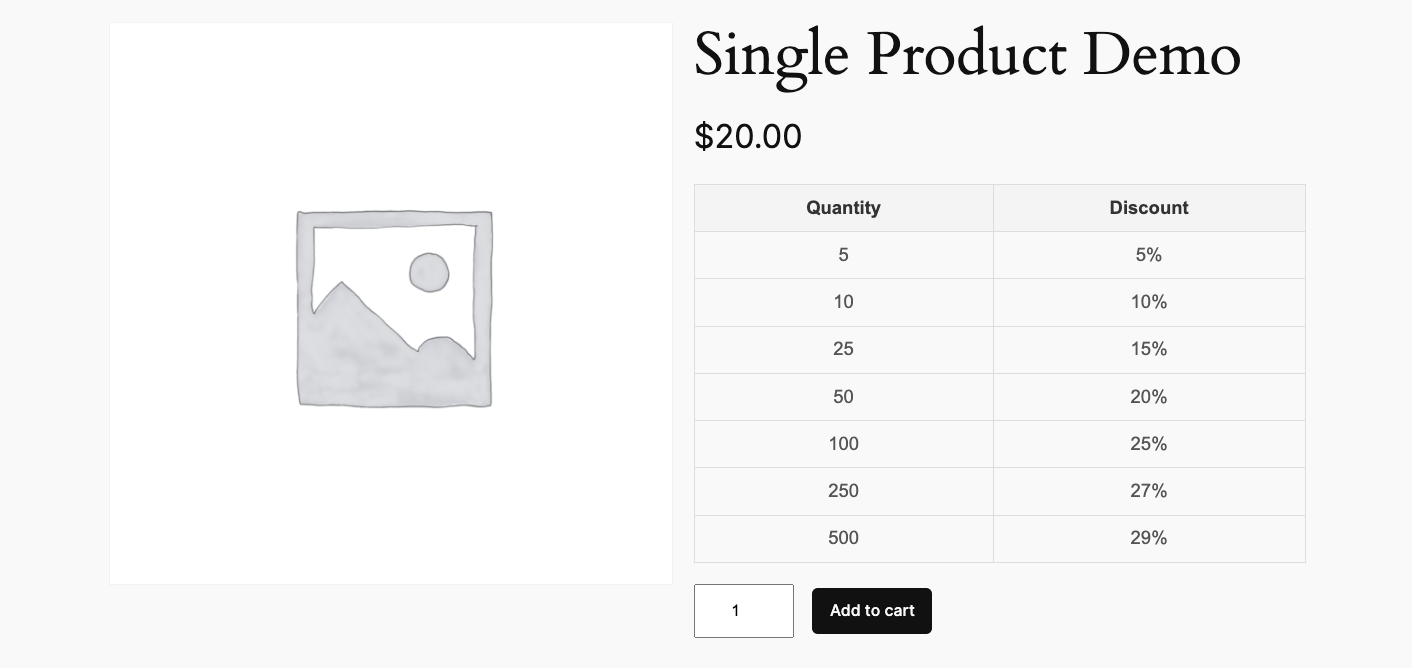
Code Installation
There’s 4 steps :
- Copy and paste the PHP code to the end of your child themes functions file
- Modify the values to match your quantity and discount percentages.
- Copy and paste the CSS to the end of your child themes style.css file.
- Use a quantity and pricing discounts plugin for WooCommerce to setup and calculate bulk discounts per product.
Here’s the PHP code for your child themes functions file.
add_action( 'woocommerce_single_product_summary', 'display_discount_table', 20 );
function display_discount_table() {

    global $product;

    if ( ! $product->is_type( 'simple' ) ) {
        return;
    }

    $discounts = [
        5 => '5%',
        10 => '10%',
        25 => '15%',
        50 => '20%',
        100 => '25%',
        250 => '27%',
        500 => '29%'
    ];

    echo '<table class="discount-table">';
    echo '<thead><tr><th>Quantity</th><th>Discount</th></tr></thead>';
    echo '<tbody>';
    foreach ( $discounts as $quantity => $discount ) {
        echo '<tr><td>' . $quantity . '</td><td>' . $discount . '</td></tr>';
    }

    echo '</tbody>';
    echo '</table>';
Here’s the CSS for your style.css file or additional CSS field.
.discount-table {
    width: 100%;
    border-collapse: collapse;
    margin-top: 20px;
    font-family: Arial, sans-serif;
}

.discount-table th, .discount-table td {
    border: 1px solid #ddd;
    padding: 8px;
    text-align: center;
}

.discount-table th {
    background-color: #f4f4f4;
    color: #333;
    font-weight: bold;
}

.discount-table tbody tr:nth-child(even) {
    background-color: #f9f9f9;
}

.discount-table tbody tr:hover {
    background-color: #e9e9e9;
}

.discount-table tbody td {
    color: #555;
}
Restrictions
This code only enables you to add the same table with the same values.
If you need a more dynamic solution which :
- Enables you to add unique quantities and discounts per product without editing code.
- Includes the logic to calculate cart values based on the quantity and discounts in your table per product.
- Creates a clickable table rows enabling rapid selection of bulk quantities.
- Includes an extra column for price per unit based on quantity & discount percentage.
- Only requires you to enter numbers on your product edit screen.
Try the Quantity Discount Table Plugin for WooCommerce which you can install as a plugin OR use as code in your child theme. Works exactly the same for both.
Was this helpful?
Thanks for your feedback!
Leave a Reply
You must be logged in to post a comment.