
Bulk Import Authorized Customer Emails in Seconds
Managing large lists of authorized customer email addresses just got a whole lot easier. Our WooCommerce plugin Advanced Product Purchase Restrictions now includes a powerful CSV import feature that lets you upload hundreds of email addresses at once.
Why CSV Import?
If you have a large customer base or need to manage extensive email lists for product restrictions, manually typing or pasting email addresses becomes impractical. CSV import solves this problem by allowing you to:
- Import hundreds of emails in a single upload
- Use existing customer lists from Excel, Google Sheets, or CRM systems
- Save hours of manual work with automated processing
- Ensure data accuracy with built-in validation
How CSV Import Works
The process is incredibly simple:
- Prepare your CSV file with email addresses
- Upload the file using the import interface
- Automatic processing validates and imports emails
- Instant results with success/error feedback
Supported CSV Formats
Our Advanced Product Purchase Restrictions plugin handles multiple CSV formats automatically:
Single Column (One email per line):
customer1@example.com
customer2@example.com
customer3@example.com
Multi-Column (Comma-separated):
customer1@example.com,customer2@example.com,customer3@example.comMixed Formats: The plugin intelligently parses any combination
Smart Import Features
Automatic Validation
- Every email address is validated before import
- Invalid emails are automatically filtered out
- No more typos or formatting errors
Deduplication
- Duplicate emails are automatically removed
- Existing emails are preserved
- Clean, unique email lists every time
File Size Limits
- Maximum file size: 10MB
- Supports tens of thousands of email addresses
- Efficient processing for large files
Real-time Feedback
- Progress indicators during import
- Success/error messages
- Import statistics (new vs. total emails)
Perfect Use Cases
Wholesale Businesses
- Import customer lists from email marketing software
- Bulk add business customers
- Manage distributor access
VIP Programs
- Import exclusive customer lists
- Grant early access to loyal customers
- Manage membership tiers
Beta Testing
- Import tester email addresses
- Manage product testing groups
- Control access to beta products
Industry Partners
- Import partner customer lists
- Manage collaborative product access
- Control distribution channels
Technical Benefits
No Form Conflicts
- AJAX-based import prevents WordPress form issues
- Seamless integration with existing settings
- No page reloads or lost data
Security First
- Proper nonce verification
- File type validation
- User permission checks
Getting Started
- Navigate to WooCommerce > Purchase Restrictions
- Scroll to “Allowed Email Addresses” section
- Click “Choose File” and select your CSV
- Click “Import CSV” and watch it work!
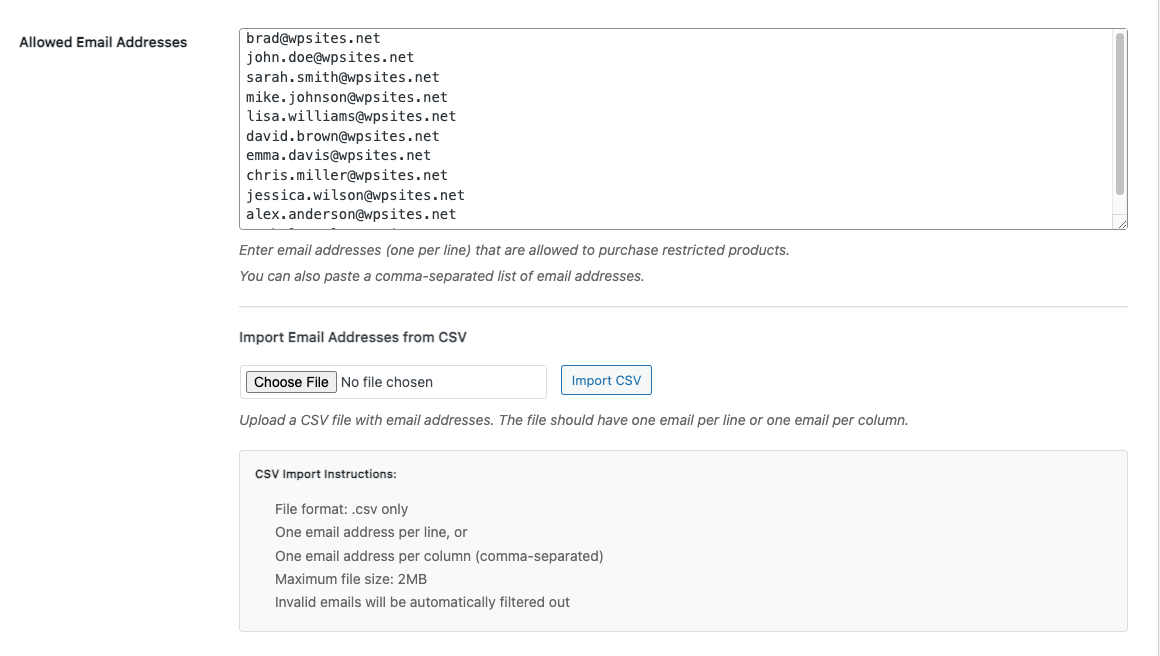
CSV File Requirements
- File format: .csv only
- Maximum size: 10MB
- Encoding: UTF-8 recommended
- Headers: Optional (will be ignored)
Import Results
After a successful import, you’ll see:
- Number of new emails imported
- Total email count in your list
- Success confirmation message
- Updated email textarea with all addresses
Get the Advanced Product Purchase Restrictions Plugin →
Leave a Reply
You must be logged in to post a comment.