
If you’re running a WooCommerce store, replying to customer reviews is a great way to build trust and show that you care. With the JudgeMe Product Reviews for WooCommerce plugin, it’s easy to do!
Step 1: Install and Activate the Plugin
You can get the plugin here:
Once you’ve purchased and installed the plugin, activate it from your WordPress dashboard.
Step 2: Enable Admin Replies
- In your WordPress dashboard, go to:
Products > JudgeMe - Scroll down to the Admin Reply Settings section.
- Choose how you want admin replies to be displayed:
- Icon
- Avatar
- None
- You can also customize the reply label text (e.g. “Admin Reply” or “Store Response”).
Step 3: Reply to Reviews
Once enabled, here’s how to reply:
- Go to any product page on the frontend of your website.
- Scroll to the Reviews section.
- Under each customer review, you’ll see a reply option (only visible to logged-in admins).
- Click “Reply,” type your message, and hit submit!
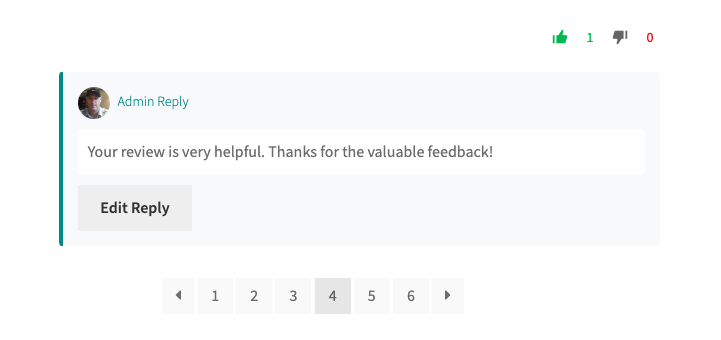
Tip: Keep replies polite, helpful, and personal. Even a short “Thanks for the feedback!” goes a long way.
Why Use Review Replies?
- Show customers you care
- Address concerns directly
- Build trust and social proof
- Boost customer satisfaction
Bonus: Customize How Replies Look
You can control how your replies appear:
- Add an icon or avatar
- Choose where replies appear (inline or after the review)
- Use custom text like “Store Owner Reply” or “Thanks for your review!”
All of these options are available under:
Products > JudgeMe > Admin Reply Settings
Want More Features?
This plugin also supports:
- Image uploads in reviews
- Review reactions (upvotes/downvotes)
- Bar graph stats
- Pagination control
- Verified badges
Check out the full plugin here:
Conclusion
Replying to product reviews is a simple but powerful way to engage with your customers. With the JudgeMe plugin, it’s easier than ever to do it right inside your WooCommerce store.
Leave a Reply
You must be logged in to post a comment.