
This code displays the cost price on the single product page using WooCommerce. To add the cost price, you’ll need to enable the experimental featured in WooCommerce > Settings > Advanced > Features > Experimental features > Cost of Goods Sold.
| Cost of Goods Sold | Cost of Goods Sold Allows entering cost of goods sold information for products. Feature under active development, enable only for testing purposes |
|---|
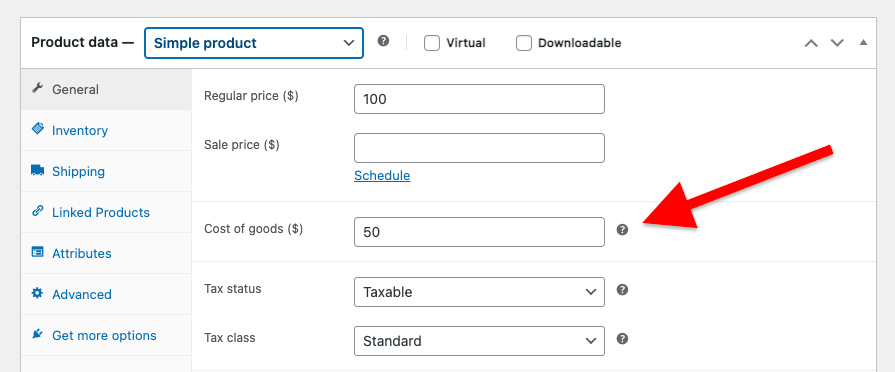
Once you have enabled this feature, you’ll find a Cost of goods field on your edit product admin page for product Data > Simple Product general tab.
You can then add the following PHP code to the end of your child themes functions file or code snippets plugin.
add_action( 'woocommerce_single_product_summary', 'display_native_cost_of_goods', 25 );
function display_native_cost_of_goods() {

if ( ! current_user_can( 'manage_woocommerce' ) ) {
        return;
    }

    global $product;

    if ( ! is_a( $product, 'WC_Product' ) ) {
        return;
    }

    $cost = $product->get_cogs_total_value();

    if ( $cost !== '' ) {
        echo '<p class="product-cost-price"><strong>Cost Price:</strong> ' . wc_price( $cost ) . '</p>';
    }
}
Related Solutions
Was this helpful?
Thanks for your feedback!
Leave a Reply
You must be logged in to post a comment.