 Configuring the WP Touch plugin to play nice with the WP Super Cache plugin is fairly easy.
WPtouch will create a mobile friendly theme from your existing theme so your site is easier to use when accessed from a mobile device.
WPtouch Settings
Step 1 Install and enable WPtouch and navigate to Settings > Advanced Options
Under Custom User Agents in Advanced Options, copy all the currently enabled user agents.

WP Super Cache Settings
Step 2 Navigate to WP Super Cache Settings > Rejected User Agents
Paste the user agents into the rejected user agents box
Android, CUPCAKE, Googlebot-Mobile, bada, blackberry 9800, blackberry9500, blackberry9520, blackberry9530, blackberry9550, dream, iPhone, iPod, incognito, s8000, webOS, webmate.
You’ll need to remove all commas and spaces so each user agent is under the other.
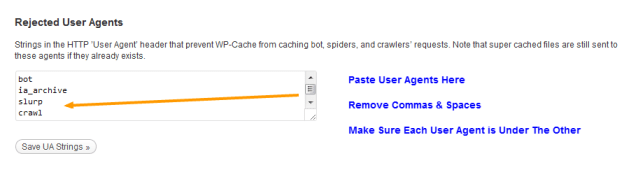
Step 3 Delete the cache and refresh the page.
That’s all you need to do to configure WPtouch with WP Super Cache
If you get stuck, you’ll find more information about WPtouch including a video on their website.
Otherwise you may find help in the WPtouch WordPress forum.
Leave a Reply