Have you ever thought about finding other bloggers to help manage your WordPress administration?
The only problem is you need people who you can trust.
You also need people that are capable of handling different levels of responsibility.
Trust is built up over time and WordPress offers a great solution for this purpose.
WordPress offers built in functions that enable you to assign users different roles based on trust and capabilities.
Let’s take a look at what the different roles are which you can assign to registered users.
User Roles
There’s basically 5 user roles for single sites.
Subscriber – A subscriber can only login and edit their profile. They only get access to their user profile page.
Contributor – This role is perfect for guest post contributors. A contributor role allows the user to login and write, edit new posts but not publish them. They can manage their posts then submit them for review to someone in an editor role or admin role. They cannot upload files and do not have access to the media library.
Author – This role enables the registered user to write, edit, publish, delete, upload files and manage their posts. Both editors and admin get access to all their content and can make any changes they want to.
Editor – This role enables the user to manage posts submitted for review by contributors before publishing. Editors can also make any changes to posts managed by authors. They can also write, manage and edit their own posts and moderate comments for everyone below them.
Admin – This role is normally reserved for the blog owner. The role enables full access to all content as well as access to plugins, themes and everything included in their WordPress installation. Owners are automatically assigned this role based on the email address they use when installing WordPress.
Changing User Role Capabilities
You can change the capabilities users are assigned by installing a plugin.
There’s several recommended plugins which do this:
- User Access Manager
- Advanced Access Manager
- User Role Editor – (Screen-shot below)
- Role Scoper Plugin
- Members
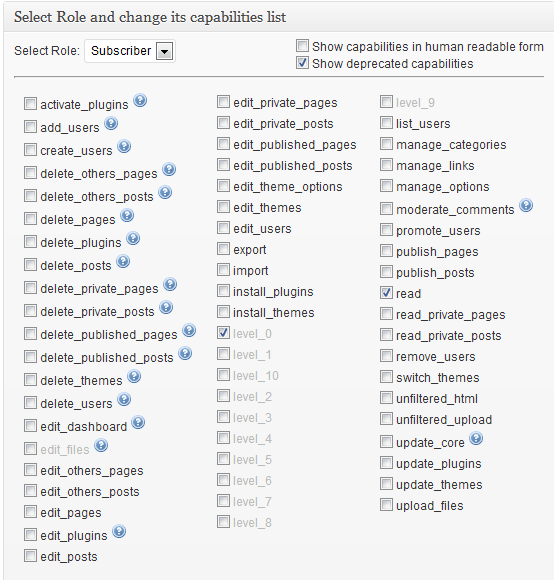
I’ll be reviewing these plugins soon and writing about the most useful functions that they offer for managing the different roles and capabilities of registered users.
I am wondering when you will be following up with your reviews on
User Role Capabilities in WordPress as you mention at the end of this article.
Hello Diane
Decided not to review that plugin because i believe code is more efficient and flexible for customization.
That’s the big drawback with plugins, they aren’t efficiently coded or as flexible as custom code.