
Even if checkout does not complete, spam bots can generate thousands of failed orders just by hitting your checkout page.
To prevent spam bots from generating failed orders, you can limit how many orders are generated using your WooCommerce > Settings > Advanced > Features > Rate limit Checkout which enables rate limiting for Checkout page orders.
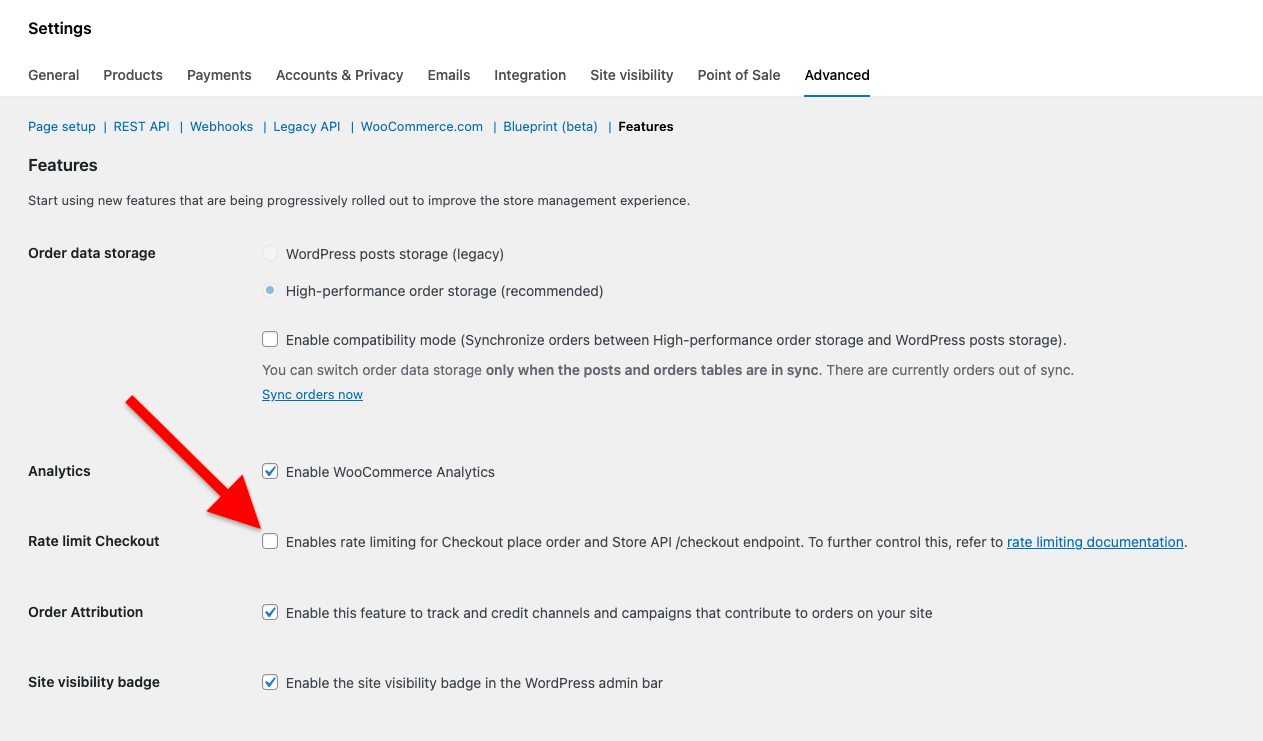
Or
You can use code to customize the rate limiting options manually.
add_filter( 'woocommerce_store_api_rate_limit_options', function() {
	return [
		'enabled' => false, // enables/disables Rate Limiting. Default: false
		'proxy_support' => false, // enables/disables Proxy support. Default: false
		'limit' => 25, // limit of request per timeframe. Default: 25
		'seconds' => 10, // timeframe in seconds. Default: 10
	];
} );- Use a anti spam plugin or code that adds a reCAPTCHA to your checkout page
- Install a plugin to verify email address before checkout
Was this helpful?
Thanks for your feedback!
Leave a Reply
You must be logged in to post a comment.